Posts

Showing posts with the label Azure

Understanding Azure Synapse Analytics
Image
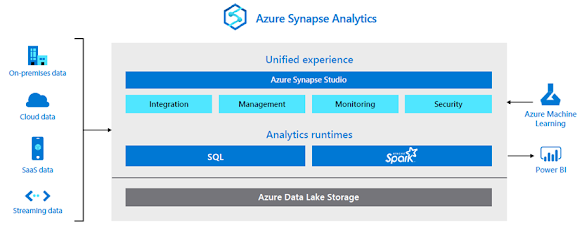
  Today, businesses are forced to maintain two types of analytical systems, data warehouses and data lakes. Data warehouses provide critical insights on business health. Data lakes can uncover important signals on customers, products, employees, and processes. Both are critical, yet operate independently of one another, which can lead to uninformed decisions. At the same time, businesses need to unlock insights from  all  their data to stay competitive and fuel innovation with purpose. Can a single cloud analytics service bridge this gap and enable the agility that businesses demand? Azure Synapse Analytics, a limitless analytics service, that brings together enterprise data warehousing and Big Data analytics. It gives you the freedom to query data on your terms, using either serverless on-demand or provisioned resources, at scale. Azure Synapse brings these two worlds together with a unified experience to ingest, prepare, manage, and serve data for immediate business int...

Data Governance with Azure Purview

Image
The modern workplace his a data-centric world. Organisations are always increasing the amount of data they must collect, store, and analyse to inform critical business decisions and measure their organisation’s performance. As data becomes increasingly important, so do the tools needed to discover, manage, and track information in the absence of a data governance program. In the absence of a data governance program, the decisions made about key data systems are made by association staff who “own” the system. When there are different owners for systems (which is very common), the result is inconsistencies in data availability, collection, usability, integrity, and security. This instantly causes data quality problems. It also can negatively impact user experience if there is no integration or procedures to update the existing data within your environment. If you and your organisation find yourselves in such a predicament, Prometix highly recommends deploying an Azure Purview solution....

CI/CD pipeline on Azure

Image
Azure DevOps by Microsoft is one of the leading tools used for automating the code builds, automation tests and deployment to the desired environment. It also helps us in maintaining the version of the code using the Repos, and Continuous Integration (CI) methodology is achieved by allowing the developers to check in the code into the shared repository, which in turn gets verified by automated test cases and build sequence. Continuous Deployment (CD) is achieved through Azure Release Pipelines where the build packages (output of CI) are deployed to different environments like Stage, UAT or Production. The changes deployed can include the build or any configuration changes, error fixes etc. Before we get into Azure Pipelines lets look into Azure DevOps & core features.  What is Azure DevOps? Azure DevOps was launched in October 2018. It’s a Software as a Service platform that comprises a complete set of tools that not just provides the DevOps capabilities, but also provides the ...

Modernise your application with Azure Logic Apps

Image
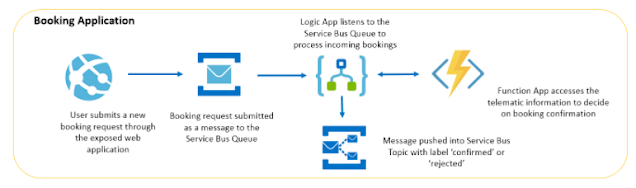
Azure Logic Apps is a powerful Platform as a Service (PaaS) offering within Azure, where users can connect their organisation’s apps and services, develop and run automated workflows in the cloud, and automate existing workflows. Logic Apps have a simple user interface that does not require a single line of code, and the only prerequisite is having an Azure subscription.   For a better understanding of Azure Logic Apps, let us consider a business scenario, Taxi Booking Application. There are two main components in the application, the Vehicle Telematics application to collect real-time data of the cabs to provide necessary information for booking. The Booking application to facilitate cab booking by customers. The booking application is built using Azure Serverless resources like Web App, Service Bus Queue and Topic, Logic App, and Azure Function which is of focus now. Below is the Service map illustrating how these Azure Services are integrated together by Azure Logic Apps. C...

Management made easy with Azure Arc

Image
At Microsoft’s Virtual Ignite 2020 conference, a technology took a centre stage: Azure Arc. Part of the Azure Hybrid solution, Azure Arc is a concept and an agent technology, based on well understood Desired State Configuration (DSC) tools, that extends Azure management features to on-premises or other-cloud Windows and Linux computers. You can think of Azure Arc as a ‘management platform as a service’ solution, hosted by Microsoft as a free PaaS service. Microsoft refers to the management layer where Azure Arc lives as the Control plane and it’s happy to share it with you. Azure Arc adds no additional cost to your Azure bill. For free you can use just the default Control plane functions such as tags and role-based access control (RBAC). However, the value from Azure Arc arises when you use Azure Policy to deploy other agents and services–like Azure Monitor, Azure Sentinel, and Backup—via Azure Arc. Below figure illustrates how Azure Arc provides free control plane services (left) ...

All you need to know about Azure integration tools

There are four main Microsoft Azure integration tools for applications -- both on premises and cloud-based -- as well as data and processes: Logic Apps, Service Bus, API Management and Event Grid. Learn the basics of each of these Azure integration tools below. Azure Logic Apps:   Logic Apps  is a cloud service that enables enterprises to connect on-premises and cloud systems with prebuilt APIs as Microsoft-managed connectors. Users can schedule, automate and orchestrate various tasks, processes and workflows for integration purposes. When logic app, which is an application built by the Logic Apps tool, is triggered, it runs the action needed -- such as data conversion and flow controls. Rather than deal with code, users can build these logic apps with a visual design tool. Microsoft also offers prebuilt template and connector galleries. Azure Service Bus:  Service Bus is a cloud messaging service that transfers data between applications and services via messages. Add...

Azure Data Lake Storage Gen2

Azure Data Lake Storage Gen2 takes core capabilities from Azure Data Lake Storage Gen1 such as a Hadoop compatible file system, Azure Active Directory and POSIX based ACLs and integrates them into Azure Blob Storage. This combination enables best in class analytics performance along with Blob Storage’s tiering and data lifecycle management capabilities and the fundamental availability, security and durability capabilities of Azure Storage. The simplest way to enable Hadoop applications to work with cloud storage is to build a Hadoop File System driver which runs client-side within the Hadoop applications. This driver emulates a file system, converting Hadoop file system operations into operations on the backend of the respective platforms. This is often inefficient, and correctness is hard to implement/achieve. For instance, when implemented on an object store a request by a Hadoop client to rename a folder (a common operation in Hadoop jobs) can result in many REST requests. This is...

Details on Azure AD Connect (BASIC)

Image
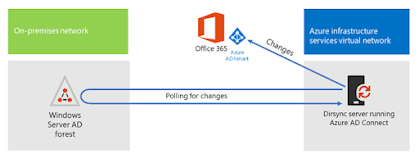
Microsoft has discontinued DIRSYNC and directory synchronisation tool. Instead they have released Azure AD. I have provided insight into  Azure D Connect for those who didn’t know. Azure AD Connect is a bridge solution between an organisation’s on-prem Active Directory instance and cloud-based Azure Active Directory. AD Connect enables IT admins to federate on-prem user identities to the Azure platform. Actually, it’s a good way to enable single sign-on (SSO) without having to set up an Active Directory Federation Services (ADFS) instance. So, for Microsoft-focused organisations’, this concept of an identity bridge solution, which is very much like the concept of Google Cloud Directory Sync (formerly called Google Apps Directory Sync, GCDS or GADS), makes a lot of sense. So how does Azure AD Connect and Azure AD fit in with the rest of Microsoft’s strategy for Active Directory? Microsoft’s strategy with Azure Active Directory hasn’t been to deliver it as a cloud-based replaceme...

Azure Webjobs and functions explained

Recently I had questions from my customers asking the differences between Azure web jobs VS Functions. At Prometix we have developed numerous Azure based applications and here is my thought. In the early days, Azure was a thin veneer over virtual machines, and since then it has grown to the point where,   you need to choose which service to use to host your code. From virtual machines to Azure Functions, we can tune just how much abstraction there is between our application code and the hardware. This article is about picking between two of the abstractions that run furthest from the hardware: WebJobs and Azure Functions. App Service Let’s start by talking about App Service, which is the technology that underlies both of these offerings. App Service started its life as a way of hosting applications inside of IIS (Internet Information Services) on Windows. The separation between the applications was provided by IIS and, as such, the configurability and isolation of these servi...