Posts

Showing posts with the label Power Platform

All you need to know about Microsoft 365 formally known as Office 365
Image
  As a product line, Microsoft Office dates back nearly three decades, with early versions essentially combining Word, Excel, and PowerPoint into a discounted bundle. Microsoft 365 (previously known as Office 365), which has been available since 2011, differs from that old-fashioned bundle in two respects: First, it's sold as a subscription (billed monthly or yearly), rather than as a perpetual license with a fixed one-time payment. Second, it combines a suite of online services, including business-class email, cloud file storage, and secure communication tools along with the traditional desktop apps. Because it's a subscription offering, those desktop programs are updated automatically when a new version is available. If your subscription is current, you get the latest versions, with security releases monthly  and feature updates every six months, on the same calendar as Windows 10. Microsoft 365 is available in Family and Personal editions (previously known as Office 36...
Read text from an image using AI Builder for Power Platform

Image
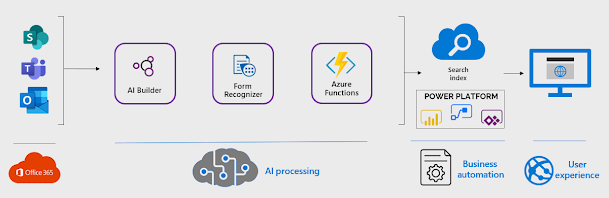
  Transcribing text from images is tedious, time-consuming and error-prone. Luckily, you don’t need to manually transcribe text anymore thanks to text recognition in AI Builder. In just a few clicks, you can extract text from an image or PDF. It works on file formats such as .PDF, .PNG and .JPEG. You can then use the extracted text in emails and other tasks, saving you a lot of time and boosting productivity. Getting Started The text integration model in Power Automate flows and Power Apps is guaranteed to save you time and reduce your manual workload, especially if you deal with a lot of handwritten notes which need to be digital. The GIF on the side shows you how to do that. Keep in mind that you will need AI Builder. If you don’t have a subscription for it, you can still try it out for free using the Power Apps Developer Plan. Go to this website and select AI Builder > Build from the left navigation menu. Click on the Text Recognition model. Using Text Recognition You can use...

PowerApps coding made easier with AI based PowerFx

Image
Absolute treat for the developers, as Microsoft is integrating AI technologies with its PowerFx low-code programming language. PowerFx, an open-sourced, formula-based tool, is  built on Microsoft Excel . This integration will enable customers to use natural-language input and "programming by example" techniques when developing with PowerApps. Microsoft announced the coming new capabilities during the opening day, May 2021 developers conference. Officials said these new features will be in public preview at the end of June in certain regions. Microsoft is using GPT-3 (Generative Pre-trained Transformer 3) and the Program Synthesis Using Examples (PROSE) software development kit.  GPT-3 is a natural-language AI model  from  OpenAI, an organization with which Microsoft has been collaborating for a while . The PROSE technology comes from Microsoft Research and is already integrated into Power BI, Excel, and Visual Studio. Officials said the integration of GPT-3 in ...

How to maximise your existing Office 365 infrastructure as part of your digital transformation

Image
How can it help you maximise the use of existing infrastructure and investment – specifically Office 365 and MS Teams, to address your current challenges and accelerate your journey to get to the next level of Digital Maturity Model of engagement  To explain that, lets first look at the traditional method of developing and delivering systems without delving too much into the different methodologies. Typically, the business would capture their requirements, and then decide to build (develop and validate) or buy (select and off the shelf application and configure it), then implement the system. Typically, this would take a significant time from start to finish. This may still be the route for implementing large scale deployments e.g. implementing a Manufacturing Execution System. But in terms of the following use cases, is there a new way : Automating a business process or workflow, that is largely paper based, involves people interacting with several systems, and also using tools li...

PowerApps coding made easier with AI based PowerFx

Absolute treat for the developers, as Microsoft is integrating AI technologies with its PowerFx low-code programming language. PowerFx, an open-sourced, formula-based tool, is  built on Microsoft Excel . This integration will enable customers to use natural-language input and "programming by example" techniques when developing with PowerApps. Microsoft announced the coming new capabilities during the opening day, May 2021 developers conference. Officials said these new features will be in public preview at the end of June in certain regions. Microsoft is using GPT-3 (Generative Pre-trained Transformer 3) and the Program Synthesis Using Examples (PROSE) software development kit.  GPT-3 is a natural-language AI model  from  OpenAI, an organization with which Microsoft has been collaborating for a while . The PROSE technology comes from Microsoft Research and is already integrated into Power BI, Excel, and Visual Studio. Officials said the integration of GPT-3 in ...

Maximise Your Existing Infrastructure to Accelerate Digital Transformation

We have been hearing lately that – how an organisation can maximise their return with existing infrastructure to accelerate the digital transformation. But what can it do for you? How can it help you maximise the use of existing infrastructure and investment – specifically Office 365 and MS Teams, to address your current challenges and accelerate your journey to get to the next level of Digital Maturity. To explain that, lets first look at the traditional method of developing and delivering systems without delving too much into the different methodologies. Typically, the business would capture their requirements, and then decide to build (develop and validate) or buy (select and off the shelf application and configure it), then implement the system. Typically, this would take a significant time from start to finish. This may still be the route for implementing large scale deployments e.g. implementing a Manufacturing Execution System. But in terms of the following use cases, is the...

Overcoming the Challenges of Remote Working with Power Platform

Currently we are monitoring numbers and focusing on some key indicators, to see if we are making progress in the battle against Covid-19. Many have also been getting used to a new way of working – adapting to some or all the team working remotely. Some of us had moved to Office 365 some time ago and have seen the benefits of having our email and other files and applications running in the cloud. The next step was to migrate to MS Teams, and before the current crisis, many saw it as a new way of performing chat and doing video calls – a kind of better version of Skype in many respects. We looked on it as a communications tool. I think many companies have seen in a very short period of time that there is so much more to MS Teams. It’s really a productivity tool, that does the other bits too. Digital Transformation is the key for success MS Teams was being looked at as an option. Could the normal metrics, visual management boards, and Operations discussions at the line level, the ...

Power Platform connecting the dots

The three main clouds of Microsoft are Microsoft 365, Dynamics 365 and Azure. Power Platform is the connecting layer that allows customers to harness tools and data from these clouds into unique solutions that support their own business processes. Combining common productivity tools from Office 365, process management apps from Dynamics 365 and cutting edge Data & AI services from Azure is the fastest way to create new digital tools for your employees. Power Platform enables all of this without the need for custom software development projects. Power Platform runs on Azure’s global cloud infrastructure and can scale from personal productivity apps to enterprise wide operational systems. Low code development According to Gartner, low-code applications will represent 65% of all application development activity by 2024. Faster time to market, app developer productivity, improved end user experiences and lower total cost of ownership are some of the key factors driving this shi...

Better leverage your Office 365 investments while working from home

The outbreak and rapid spread of COVID-19, commonly known as coronavirus, has prompted many companies to implement emergency work-from-home protocols to avoid exposure in the workplace. Due to this many businesses now encouraging or even mandating that employees work from home amid this global health crisis over the coronavirus, millions of people can expect to have their daily routines and work styles impacted. But not everyone is accustomed to working from home and getting into work mode from a space that’s not your regular one can be a huge adjustment. The bright side of working from home is that you save time on a commute, spend more time with family, and maybe get a few more things done around the house. But the challenges, including loneliness, staying connected, and a heightened penchant for distraction, can have a significant effect on your psyche and productivity. If your company has never had a full-time remote workforce, this can be a challenging transition. However, t...

Business process development with Power Apps and MS Teams

While using legacy systems, users previously had to jump between several different systems through a series of bookmarks or company portals. This constant switching can be incredibly disruptive. According to a June 2015 UC Irvine study, “The Cost of Interrupted Work: More Speed and Stress,” it can take upwards of 23 minutes for a person to regain productivity after such an interruption. Microsoft Teams is the hub for teamwork Microsoft believes Microsoft Teams is the home for the modern workplace of the future. Out of the box, Microsoft Teams brings together the most common tasks that employees need under a single roof, such as chats, meetings, calls, and the productivity suite of Office 365. By combining these together into a sole product, employees can avoid having to constantly switch between various contexts. Instead, they can spend their time within a single team or channel that effortlessly brings together all the relevant information in-context. The Microsoft Power Platfor...

Power BI AI Features and Key Visual Influencers

Automate AI with Power BI Microsoft has released AI features for PowerBI and here are some of them. And no additional tools to be purchased: Just your good old Power BI with Premium Capacity. What is in it? Cognitive Services to tap into existing, powerful services of image recognition, sentiment analysis, and much more. Auto-ML to train a novel machine learning model for your data. AutoML automatically searches and tunes the best algorithm for your dataset. Azure ML Integration to integrate the machine learning models you have developed in Azure Machine Learning Studio, directly to your Power BI workspace. Power BI AutoML in action Let’s say that you have an online retail store, and you want to predict if your customers are going to purchase your products based on their interactions. Such a prediction is very important, as you can: Dynamically adjust your website’s response to the customers – especially convince the customers that may otherwise change their...