Posts

Details on Azure AD Connect (BASIC)
Image
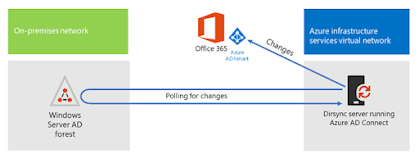
Microsoft has discontinued DIRSYNC and directory synchronisation tool. Instead they have released Azure AD. I have provided insight into  Azure D Connect for those who didn’t know. Azure AD Connect is a bridge solution between an organisation’s on-prem Active Directory instance and cloud-based Azure Active Directory. AD Connect enables IT admins to federate on-prem user identities to the Azure platform. Actually, it’s a good way to enable single sign-on (SSO) without having to set up an Active Directory Federation Services (ADFS) instance. So, for Microsoft-focused organisations’, this concept of an identity bridge solution, which is very much like the concept of Google Cloud Directory Sync (formerly called Google Apps Directory Sync, GCDS or GADS), makes a lot of sense. So how does Azure AD Connect and Azure AD fit in with the rest of Microsoft’s strategy for Active Directory? Microsoft’s strategy with Azure Active Directory hasn’t been to deliver it as a cloud-based replaceme...

Azure Webjobs and functions explained

Recently I had questions from my customers asking the differences between Azure web jobs VS Functions. At Prometix we have developed numerous Azure based applications and here is my thought. In the early days, Azure was a thin veneer over virtual machines, and since then it has grown to the point where,   you need to choose which service to use to host your code. From virtual machines to Azure Functions, we can tune just how much abstraction there is between our application code and the hardware. This article is about picking between two of the abstractions that run furthest from the hardware: WebJobs and Azure Functions. App Service Let’s start by talking about App Service, which is the technology that underlies both of these offerings. App Service started its life as a way of hosting applications inside of IIS (Internet Information Services) on Windows. The separation between the applications was provided by IIS and, as such, the configurability and isolation of these servi...

Collaboration with SharePoint VS MS Teams

With all the hustle and bustle of the workplace, it can be hard to find exactly what you’re looking for or know who to ask. Defining who is working on what and how they’re involved in the project isn’t always a simple task. Although SharePoint has made managing and sharing content easier, it still isn’t as seamless as its end users would hope. Being able to access content and applications all in one place is useful but doesn’t solve the problem of how to organize information that is only relevant to certain groups. The main goal of SharePoint is to facilitate collaboration, but when content is broadcasted to the entire organization, it can make end users unsure which information applies to them. Microsoft has acknowledged this issue with the creation of its new collaboration tools, SharePoint team sites and Microsoft Teams . These allow end users to create separate areas specifically designed for certain projects they’re working on and for the teams they’re working with. By organizi...

Planning for SharePoint Migrations

Planning for an enterprise SharePoint Migration can be challenging, painful, frustrating, and time consuming.  Define SharePoint Migration Goals The first step in SharePoint Migration planning, or in any technology migration, is to define the goals and objectives.  Simply put, this is defining: Why are we migrating? What must we have Day 1 on the new platform? What do we hope to get out of the new platform? What are the hopes/goals six months after launch?  A year?  3 years? These are small questions that can have some big answers.  Having defined goals and objectives before deep diving into planning activity will help inform your analysis and decisions.  Each stage of the planning process should be viewed through the lens of these goals and objectives.  If the “why” of the migration is part of a company-wide cloud initiative, then you know at the outset that the option to leave behind ...