Posts

Realise the important of automated chats
Image
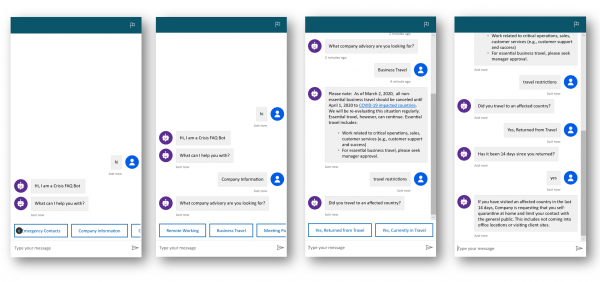
  Over the past year, companies have seen a major digital shift across industries to battle the COVID-19 pandemic. Most businesses have shifted to remote work set-ups and accelerated the adoption of digital solutions. In the midst of rapid technological change, one thing is clear: only companies that are able to adapt quickly can thrive in a post-COVID environment. Technology is vital to success – or survival – in a post-COVID business environment. There are hundreds of company success stories that are a testament to this. Many of these success stories involve the use of platform messaging and chatbots to provide services and support to customers and employees 24/7. Using chatbots as website concierges In a sense, chatbots have evolved into concierges for websites. Anyone can engage with a chatbot at any time of the day to find the right departments, web pages and documents. For internal matters, human resources, finance and facilities departments can customise chatbots to help emp...
Read text from an image using AI Builder for Power Platform

Image
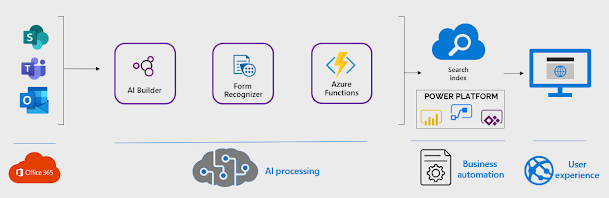
  Transcribing text from images is tedious, time-consuming and error-prone. Luckily, you don’t need to manually transcribe text anymore thanks to text recognition in AI Builder. In just a few clicks, you can extract text from an image or PDF. It works on file formats such as .PDF, .PNG and .JPEG. You can then use the extracted text in emails and other tasks, saving you a lot of time and boosting productivity. Getting Started The text integration model in Power Automate flows and Power Apps is guaranteed to save you time and reduce your manual workload, especially if you deal with a lot of handwritten notes which need to be digital. The GIF on the side shows you how to do that. Keep in mind that you will need AI Builder. If you don’t have a subscription for it, you can still try it out for free using the Power Apps Developer Plan. Go to this website and select AI Builder > Build from the left navigation menu. Click on the Text Recognition model. Using Text Recognition You can use...

Push messages to Microsoft Team via Power Virtual Agents

Image
  Did you know that it’s possible to have your chatbot in Microsoft Teams send a message to a user proactively? That means, rather than waiting for the user to chat to the bot, the bot can be the first one to message them. Proactive chatbots have several useful business applications, chief among them is that they can anticipate customer needs and improve customer satisfaction. In this blog, I’ll show you how to create a proactive chatbot using Power Virtual Agents and Power Automate. Did you know that it’s possible to have your chatbot in Microsoft Teams send a message to a user proactively? That means, rather than waiting for the user to chat to the bot, the bot can be the first one to message them. Proactive chatbots have several useful business applications, chief among them is that they can anticipate customer needs and improve customer satisfaction. In this blog, I’ll show you how to create a proactive chatbot using Power Virtual Agents and Power Automate. This is the flow t...

MS Teams App for Salesforce

Image
Software-as-a-service CRM giant Salesforce has made its app for Microsoft Teams more broadly available. The Salesforce app for Teams has been available in preview since October. It replicates the Salesforce CRM app for Slack, allowing joint Teams and Salesforce customers to mention various Salesforce records in Teams channels and chats, such as opportunities, accounts, cases, contacts, and leads. Service teams can also improve coordination and response times to open cases to help keep customers happy, reduce the support loads, and cut out productivity barriers caused by switching between Teams and Salesforce. Announcing the general availability of Salesforce for Teams, Microsoft described Salesforce as part of a "new class" of "collaborative apps".  Salesforce and Microsoft compete in CRM – Microsoft Dynamics versus Sales Cloud – and analytics with Tableau and Microsoft PowerBI.  While the Slack purchase opened up a new front of competition between Salesforce and Mi...

PowerApps coding made easier with AI based PowerFx

Image
Absolute treat for the developers, as Microsoft is integrating AI technologies with its PowerFx low-code programming language. PowerFx, an open-sourced, formula-based tool, is  built on Microsoft Excel . This integration will enable customers to use natural-language input and "programming by example" techniques when developing with PowerApps. Microsoft announced the coming new capabilities during the opening day, May 2021 developers conference. Officials said these new features will be in public preview at the end of June in certain regions. Microsoft is using GPT-3 (Generative Pre-trained Transformer 3) and the Program Synthesis Using Examples (PROSE) software development kit.  GPT-3 is a natural-language AI model  from  OpenAI, an organization with which Microsoft has been collaborating for a while . The PROSE technology comes from Microsoft Research and is already integrated into Power BI, Excel, and Visual Studio. Officials said the integration of GPT-3 in ...

Exploring the possibilities with Microsoft Viva technology platform

Image
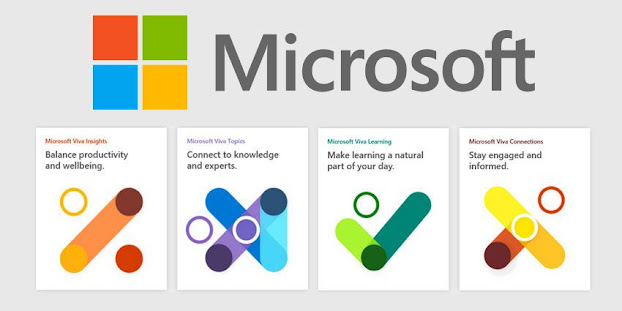
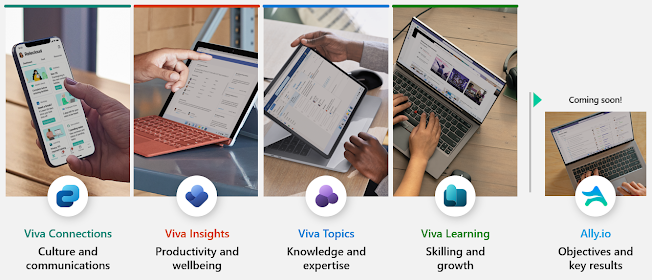
It was in February 2021 Microsoft Viva was announced. Since it is a new platform and there are so many questions around this technology. I thought this will be an opportunity to let my customers and network know what this really is and go through the key components. Microsoft positions Viva as an Employee Experience Platform. This workplace analytics (Viva) is described as bringing together tools for employee communications, wellbeing, learning and knowledge discovery into one solution. Microsoft Viva is comprises of four modules: Viva Connections  – a combination of company-branded SharePoint portal (aka intranet) in a Teams app with Yammer Communities and stream video integration. Viva Insights  – Personal and Organisational productivity reporting, building on Workplace Analytics and MyAnalytics but also pulling insights from third-party platforms like HR applications, Network access, and SAP. Viva Topics  – Using AI (formally kno...

All you need to know about Microsoft Viva

Image
What is Microsoft Viva? Microsoft describes  Microsoft Viva as " the first employee experience platform to bring tools for employee engagement, learning, wellbeing and knowledge discovery, directly into the flow of people’s work. Viva is designed to help employees learn, grow and thrive, with new experiences that integrate with the productivity and collaboration capabilities in Microsoft 365 and Microsoft Teams. " Microsoft Viva builds on the power of Microsoft Teams and Microsoft 365 to unify the employee experience across four key areas — Engagement, Wellbeing, Learning and Knowledge — in an integrated experience that empowers people to be their best.  4 Main Pillars + Ally.io (coming soon) Pillar 1: Microsoft Viva Connections Viva Connections is a framework through which you can deliver your intranet within Microsoft Teams. Effectively this is the "Home App" in Teams. Employees can access internal communications and company resources like policies and benefits an...